Proposed solution regarding work by Phd students including the kappa/monograph with regard to plagiarism control.
Regarding plagiarism control, we currently lack the e-mail function that the previous solution offered. The current solution, Inspera Originality via Sunet, has the ability to be used "stand alone" (i.e. outside the integration with Canvas and Inspera) but it does not currently work as expected. It will change, whereby this proposal may change.
The change to Originality was not at SLU's request, but because the previous tool was discontinued. We share this problem with many other Swedish universities and will return with more information as soon as new opportunities are offered.
Besides beeing able to check students' works for plagiarism, it is desirable to have a solution that enables future traceability. Traceability applies both to how the work has been submitted and assessed and to who submitted it. The connection between Ladok/Canvas and the student login, which confirms the sender, these goals are achieved.
Solution
- Course instances at the doctoral level in Ladok are automatically transferred as course rooms in Canvas in the same way as for courses at the undergraduate or advanced level. These course rooms can also be used for the kappa/monography, but separate course rooms in Canvas for the kappa/monography can be created manually (without an instance in Ladok) if desired.
Here you can order a course room in Canvas for you as a supervisor
- Phd students who are admitted to these course instances in Ladok will automatically be transferred as students to the corresponding course room in Canvas.
- When admitted in Ladok, a student login will be created for the Phd student. It is with this identity that the Phd student is added to the Canvas course (step 2).
- The Phd student needs to activate their student login.
The student login is used by the Phd student, among other things, to log in to Canvas and Evald.
- Use Assignments in Canvas to receive files from the Phd student. The assignment can be set up for plagiarism review. The results of the review are then accessed via the Speedgrader tool in Canvas. When the Phd student submits an assignment in Canvas, we also ensure that the work is available for future reviews.
Here's how to change the text matching tool
- Go to the assignment as a teacher.
- Click on Edit.
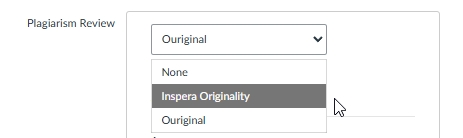
- Scroll down to Plagiarism Review.
- Change to Inspera Originality.
- You can leave the settings under Additional settings as they are.
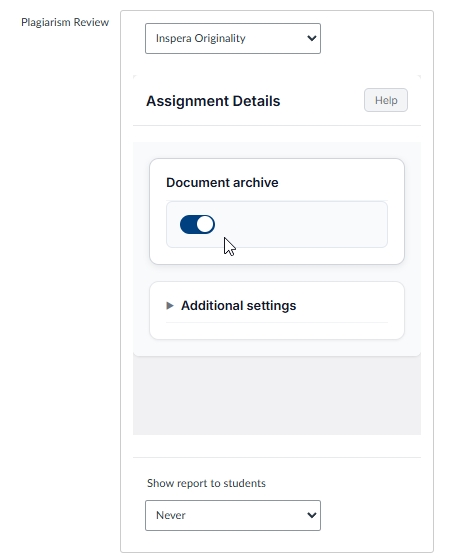
- Save at the bottom of the page.
