We have identified an issue with the function for editing teaching sessions within the booking forms. This issue occurs when creating a schedule for "Individual weeks."
We have reported the issue to the vendor and are awaiting further information on how it will be addressed.
In the meantime, we recommend following the instructions below when creating a schedule for individual weeks.
When scheduling for individual weeks, please do not use the "Edit" function accessed via right-click in the calendar view for the time being.
An edit made to a single teaching session may inadvertently affect other sessions as well.
Check which mode you are using
- You can select the mode via the Select mode drop-down menu above the calendar view. The issue specifically affects the "Individual weeks" mode.
- If you are using the Recurring mode for teaching sessions that reoccur over several weeks, you can continue to edit sessions by right-clicking in the calendar view.
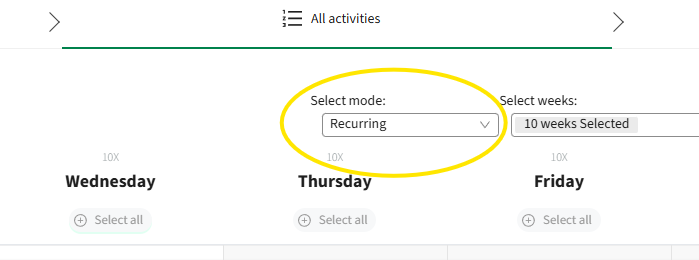
This is where you choose between "Individual weeks" and "Recurring."
How to make changes in "Individual weeks" mode
- Instead, make changes directly in the table located below the calendar view.
This table is generated when you drag and drop teaching sessions into the calendar.
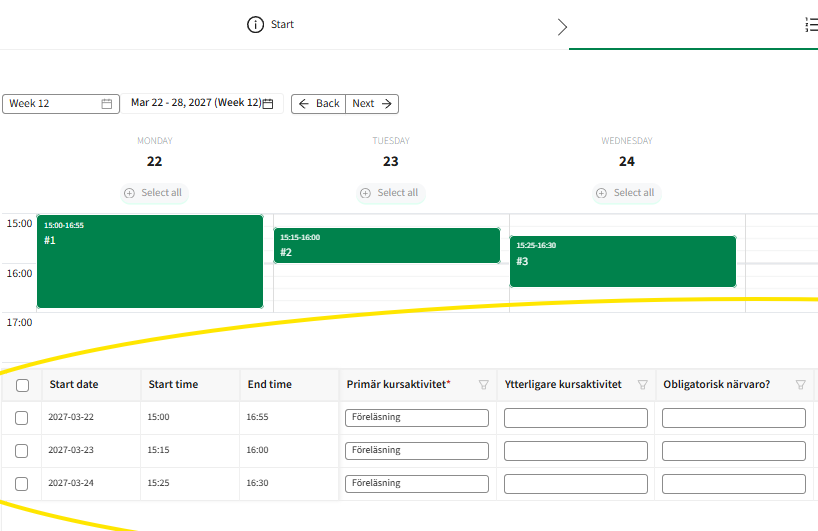
Make changes within the fields of the table, rather than right-clicking on a teaching session in the calendar.
