Informationssäkerhetslyftet (the Information Security Initiative) is a subproject within the university’s implementation of Microsoft 365 and aims to strengthen ongoing, secure, consistent, and effective information management in the Microsoft environment. As part of the project, system support, guidance, and best practices are being introduced to facilitate the proper handling, sharing, and protection of information in the digital work environment.
We are introducing a new feature called sensitivity labels, which will make it easier for the organisation to label its information (emails and documents). This is done through a simple menu in Microsoft Office applications (such as Outlook and Word), where users can choose how sensitive the information is from a confidentiality perspective - in other words, how much harm could occur if the information falls into the wrong hands. An image showing what sensitivity labels look like in practice is included in the Swedish version of this web page.
Why are we doing this?
Legislation and internal policies require that organisational information is handled correctly. Labelling information helps us to:
- create better conditions for future digitalisation and AI
- protect the organisation and sensitive information
- reduce the risk of accidental data sharing
- comply with legal requirements (e.g. GDPR and the Public Access to Information and Secrecy Act)
Who is affected?
Everyone in the organisation has a responsibility to handle information correctly. For employees working in Microsoft 365, a system support is now being introduced to make it easier to do the right thing in everyday work.
The system will be available to employees and affiliated staff at SLU. Students are not included.
How will this affect the organisation?
- The use of sensitivity labels will initially be optional, at least during 2026. The long-term ambition is for all emails and documents to be labelled, but this will only be introduced once the organisation is ready and support functions are in place.
- The system support is designed to assist users and is expected to have minimal impact on daily work
- It helps employees handle information correctly
What does this mean for you?
The project will communicate upcoming changes to managers well in advance of implementation. Invitations will be sent to registered participants for digital sessions (“information workshops”), where the solution will be presented and feedback can be provided. To register for an information workshop, please sign up via this link – registration is non-binding. The first workshop is due September 10th.
The project will also provide knowledge articles and support to the organisation.
When will this take place?
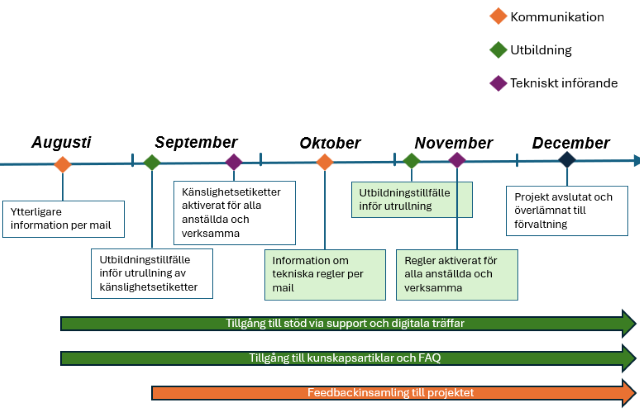
For those interested: what does this mean in practice?
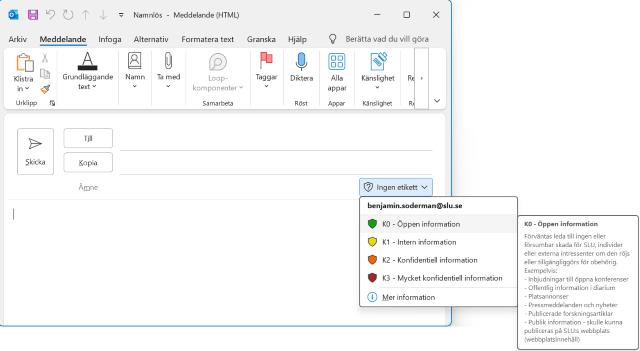
When you create a document in, for example, Word or send an email in Outlook, a new button for sensitivity labels will appear (see an example screenshot in Swedish ). This helps you classify the information you are working with based on how sensitive it is.