Contact
Information about the programme is provided continually via several channels and here on the stafff web.
You can also email questions to support@slu.se.
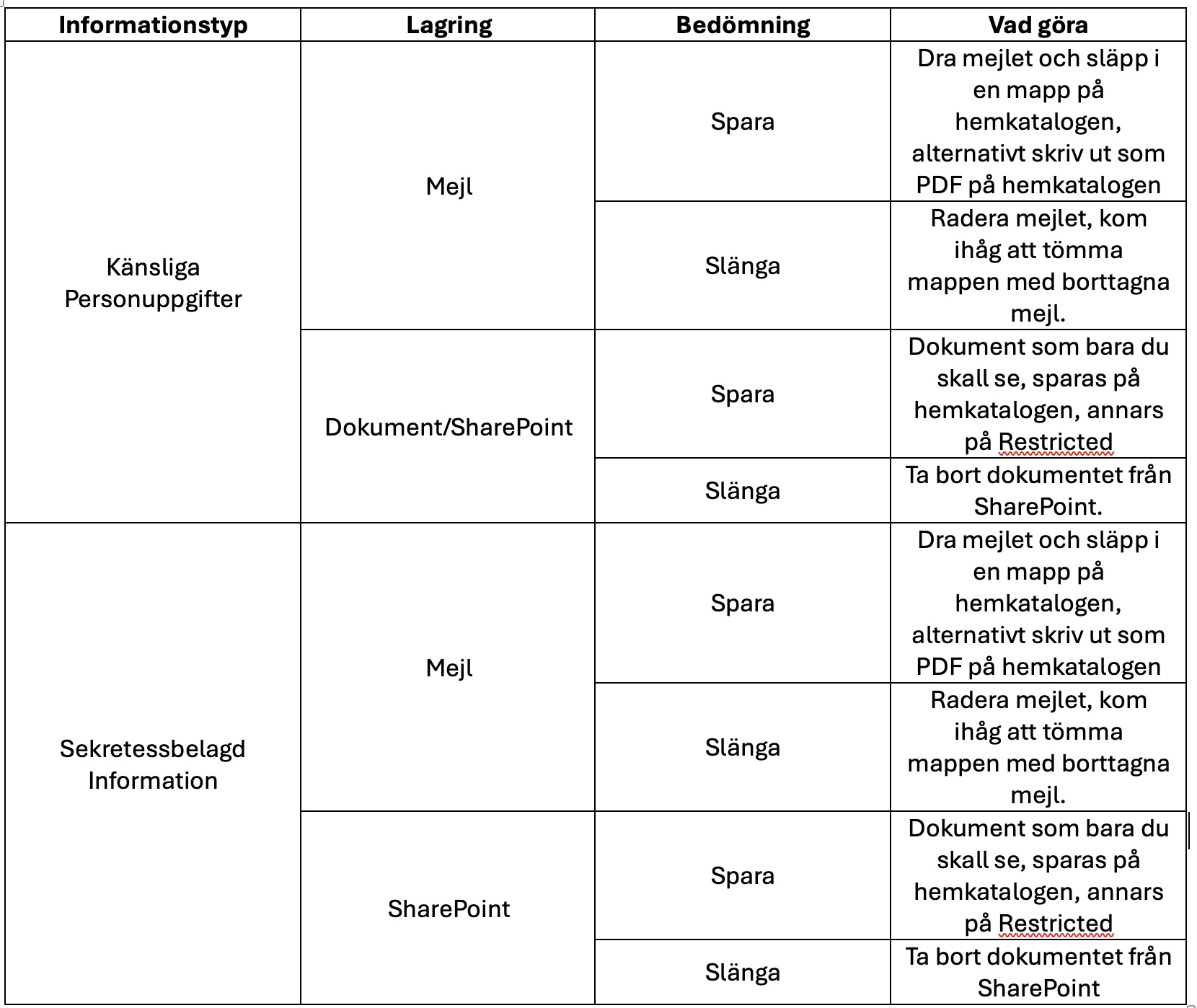
Emails containing classified information or sensitive personal data must either be deleted or saved on the local server according to the options below (see Step 1 for information about the local server):
Option 1: Drag and drop
Open the appropriate folder on your local server in File Explorer. Drag the email directly from Outlook and drop it into the folder. It will then automatically be saved as a .msg file, including any attachments.
When you want to open the file later, click on it and select Outlook from the list that appears.
Option 2: Save as PDF
Note: Attachments must be saved separately.
Tip! Search for relevant keywords such as sick or medical certificate in Outlook to identify emails that may contain sensitive information. Take the opportunity to delete old emails. Outlook must not be used as an archive. Don’t forget to review your sent emails as well. Empty the Deleted Items folder when you are finished, as this is not done automatically.
Tip 2! Many people have very large email inboxes, and it can feel overwhelming to review everything and identify what should be deleted. Take a risk-based approach! In other words, think about the types of sensitive or confidential matters and documents you frequently handle via email. Start by searching for those. Then move on to the next category. You may not find every email, but at least you'll identify the most important ones.
Documents containing classified information or sensitive personal data must be saved on SLU’s local server.
Documents intended for your eyes only should be saved in your so-called home directory (H: drive on the server). You can most easily access your home directory via Documents/My Documents in File Explorer or Finder. If you do not have an SLU computer, the home directory may not be available. In that case, order it via support@slu.se.
Documents that need to be shared with others (a group with a limited number of SLU users) must be saved in what is called a Restricted folder, which is ordered via IT:
You will then find your Restricted folder under Favorites in File Explorer. MacOS users must manually add it in Finder.
Information about the programme is provided continually via several channels and here on the stafff web.
You can also email questions to support@slu.se.